

Your network refresh
Faster, steadier Wi-Fi in every room, and your desk phones on a better switch. Nothing changes at anyone's desk.
Scroll to see what we foundWhat we found
Suite 250 is about 78 by 50 feet and wraps around a central core in an L shape. That is 3,468 usable square feet on the second floor.
Each new access point is rated to cover about 1,500 square feet. So we use three, placed one at the reception end, one by the executive office, and one in the hallway by the copy room. After the install we test the coverage and write it down for you.
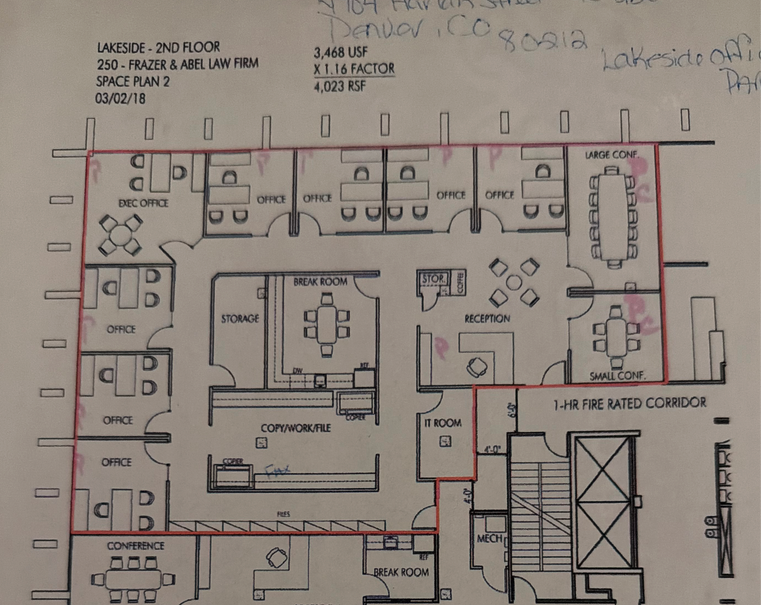
- Suite 250, Lakeside Office Park
- 3,468 usable sq ft
- About 78 x 50 ft
- 3 access points
How the install goes
Scroll to watch it happen on your floor plan. All of it is part of the 6-hour estimate on site.
Illustrative signal reach. After the install we test coverage throughout the suite and write down what we find.
The rack goes up in the IT room
We stage and configure the gateway and the switch first, then mount the wall rack in your IT room. Both light up.
Part of the 6-hour estimateThree new cable runs
We pull and terminate three Category 6 runs, about 50 feet each, from the IT room patch panel out to each access point. Your existing wall drops are reused.
Part of the 6-hour estimateAccess points go in the ceiling
One at reception beside the large conference room. One by the executive office. One in the hallway near the other conference room, beside the copy room.
Part of the 6-hour estimateThe Wi-Fi comes on
We set up the controller, the Wi-Fi names, the separate networks, the firewall rules and the guest network. The three access points reach out and overlap.
Part of the 6-hour estimateDesk phones move over
We move your desk phones onto the new switch, then check call quality and that each phone gets power.
Part of the 6-hour estimateCutover, test and write it down
We coordinate the cutover with the Comcast Business fiber install and check the handoff. Then we test the wireless coverage across the suite and document it for you.
Part of the 6-hour estimateBefore and after
Drag the handle, or use the left and right arrow keys, to slide between your plan today and the plan with three access points.
Illustrative signal reach. After the install we test coverage throughout the suite and write down what we find.
Your equipment closet
This is the closet today, and a drawing of how it looks with the rack and hardware in this proposal. Drag the handle, or use the arrow keys.
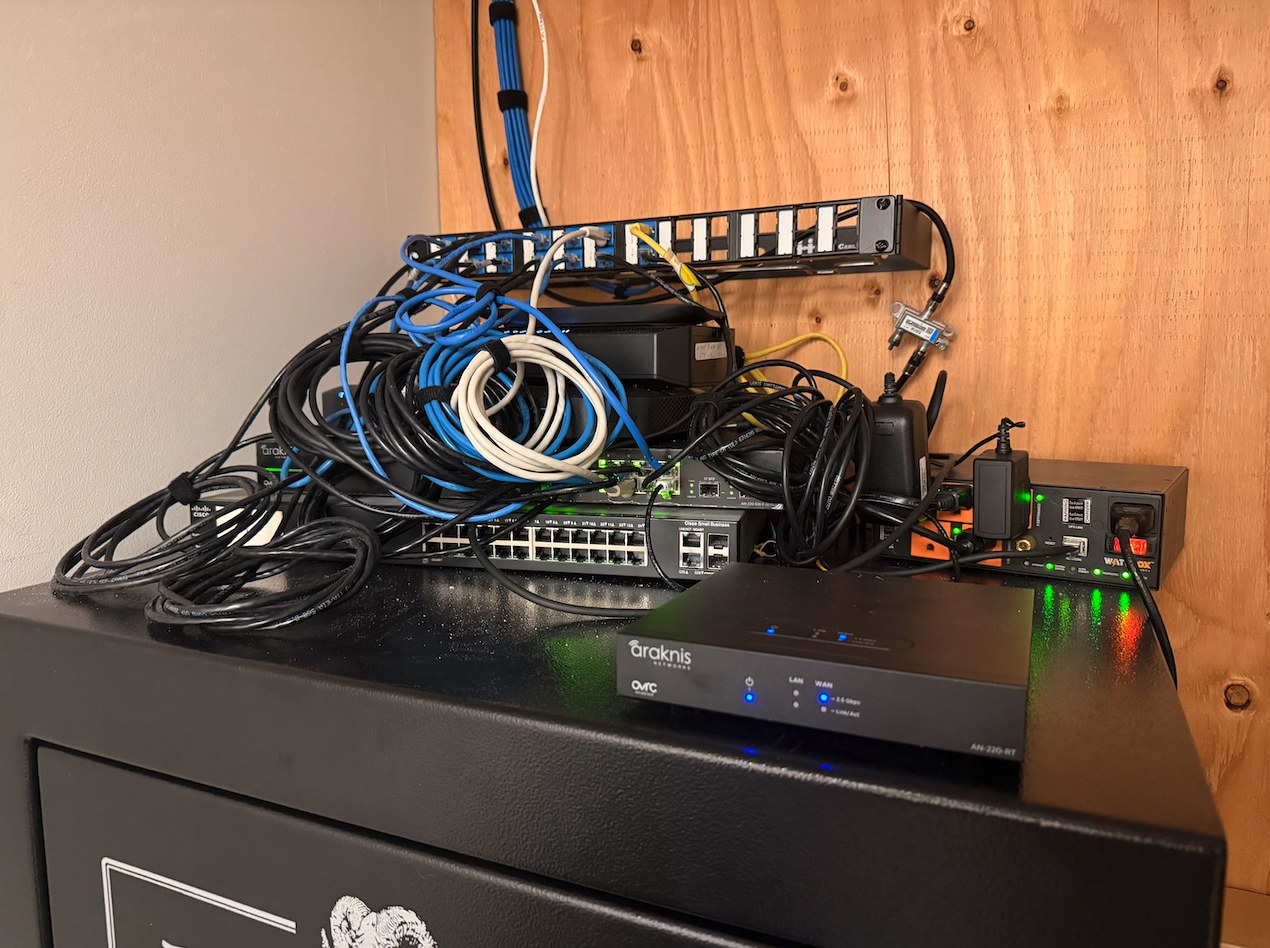
What you are looking at
Tap a dot on the picture, or a button below, to see what each piece is.
The current equipment is taken out of service. Patch cords are supplied for the new equipment. Mounting spot is confirmed on site.
Feel the difference
Three small things to try.
Joined to access point 1
Drag the dot across the plan, or focus it and use the arrow keys. As you move toward another access point, your device hands off to it. You do not have to do anything.
Illustrative signal reach. After the install we test coverage throughout the suite and write down what we find.
Sized with room to spare
ATERNA sized the switch, with its 400-watt power budget, so it handles all of your desk phones and the three access points without strain. There is room left to expand, even if the phone count changes before the install.
That is also room to add cameras or door access later without buying a new switch. Those are not part of this quote.
Firm network
- Your computers and files
- Your desk phones
Guest Wi-Fi
- Clients and visitors get online
- They never touch firm files
A guest network is a second Wi-Fi name, kept apart from your own. Clients waiting in reception can get online without getting anywhere near your files.
We set it up as part of the install.
Protect your investment: battery backup (UPS)
A recommended add-on. It is not in the quote total. ATERNA would size and price it separately, and it can be added now or any time later.
- Protects the new gear. It shields the new gateway and switch from surges and power dips.
- Keeps you working through short outages. The network and desk phones stay up for as long as the battery lasts.
- Shuts down cleanly. In a long outage the equipment powers off the right way, then restarts on its own.
- Small next to what it protects. It is usually a small fraction of the cost of the equipment behind it.
Without a UPSRunning
With a UPSRunning
Illustrative. Press the button to cut the power, and press it again to restore it.
What is included, and what is not
Included
- Stage and configure the gateway and switch
- Rack-mount the equipment in the IT room
- Pull and terminate the three new Category 6 runs
- Ceiling-mount the three access points
- Configure the controller, Wi-Fi names, VLANs, firewall rules and guest network
- Move the desk phones onto the new switch and verify call quality and power
- Coordinate the cutover with the Comcast Business fiber install and verify the handoff
- Test and document wireless coverage across the suite
- Cable runs and patch cords, at no separate charge
Not included
- Existing workstation and printer cabling stays as it is
- Internet service. Comcast Business is contracted directly by you
- Cameras, access control, alarm and AV
- Electrical, conduit, and wall patching beyond ceiling-tile access
- Data migration, workstation setup and software support
- UPS / battery backup (optional add-on, see above)
Warranty
5-year workmanship warranty from ATERNA. Manufacturer warranties come with the hardware.
ATERNA can register the hardware warranties for you.
Optional add-on: $99Not included in the total.
Payment
One single payment, up front, before any installation is scheduled.
Timing
We estimate 6 hours on site. It may run over. Extra labor is $150 an hour, and only with your approval first.
We schedule around business hours and coordinate with Hope.
Console access: ATERNA manages the network controller for security by default. You can also have your own admin login. We will choose together.
Your investment
| Item | Model | Qty | Unit | Amount |
|---|---|---|---|---|
| Gateway | UniFi Dream Machine Pro | 1 | $417.99 | $417.99 |
| Switch | UniFi Pro 24 PoE, 24 ports, 400W PoE budget | 1 | $770.99 | $770.99 |
| Access points | UniFi U7 Pro | 3 | $208.99 | $626.97 |
| Direct attach cables | SFP+ direct attach cable | 2 | $18.99 | $37.98 |
| Wall mount rack | Tecmojo 4U | 1 | $39.90 | $39.90 |
| Equipment total | $1,893.83 | |||
| Item | Detail | Qty | Unit | Amount |
|---|---|---|---|---|
| Acquisition and configuration | Equipment acquisition and configuration | 1 | $200.00 | $200.00 |
| Install labor | Configuration, install and cutover. Cable runs and patch cords are included at no separate charge. | 6 hrs | $150.00 | $900.00 |
| Services total | $1,100.00 | |||
| Total | $2,993.83 | |||
Paid once, up front, before we put your install on the calendar.
This quote is valid for 30 days from October 30, 2026. The optional $99 hardware warranty registration is not in the total.
Next step
Two simple steps. We schedule around business hours and coordinate with Hope.
Ask for your invoice
Send us one email and we reply with your invoice and installation schedule.
Send me the invoice and installation scheduleOnce your invoice is paid, pick your install window
Your install goes on our calendar after payment is received.